Workshop Scheduling: How to Stop Bottlenecks Before They Kill Your Margins
- Mark Bennet

- 15 hours ago
- 6 min read

Every workshop owner knows the feeling. Three jobs are waiting for the CNC. Two guys are standing around because materials haven't arrived. The spray booth is backed up for two days. And the job that was supposed to ship Friday is now looking like next Wednesday.
Bottlenecks aren't just annoying. They're expensive. Every hour a job sits waiting is an hour of labour you've already paid for but aren't getting value from. Every missed deadline is a client conversation you'd rather not have.
Most workshops deal with bottlenecks reactively — scrambling to fix things after they've already gone wrong. That's what workshop scheduling software is built to solve. The shops that consistently hit deadlines and protect their margins schedule proactively — using data, not gut feel.
Why Whiteboards and Spreadsheets Don't Cut It
Walk into most NZ manufacturing workshops and you'll find some version of the same system: a whiteboard on the wall, maybe a spreadsheet on someone's computer, and a lot of information living in the production manager's head.
This works when you're doing five jobs at a time. It falls apart at fifteen.
Here's why:
No real-time updates. The whiteboard shows the plan as of Monday morning. By Tuesday afternoon, three things have changed and nobody's updated it. The plan is fiction.
Can't see capacity. You know Dave's busy. But how busy? Is he at 80% or 120%? Can he take a small job this week or not? Without data, you're guessing.
No early warning system. A job running over budget doesn't trigger any alarm. You find out when it's done — too late to do anything about it.
Dependencies are invisible. Job B can't start until the parts from Job A are done. But that dependency lives in someone's head. When Job A runs late, nobody adjusts the schedule for Job B until it's already a crisis.
It doesn't scale. Add more people, more jobs, more machines, and the whiteboard method breaks down exponentially. The number of possible scheduling conflicts grows faster than any human can track.
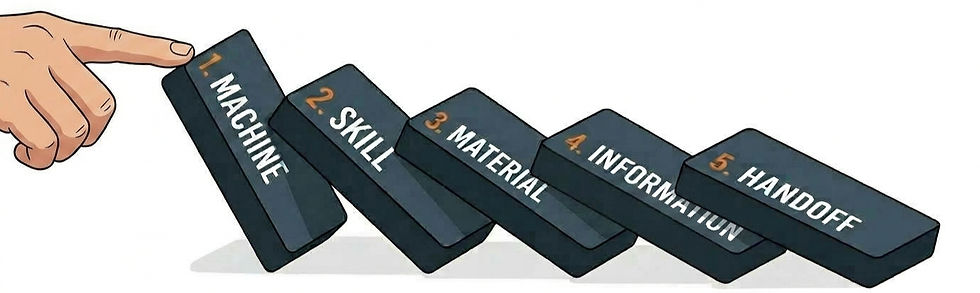
The Five Most Common Workshop Bottlenecks
Before you can fix bottlenecks, you need to name them. Here are the ones we see most often in NZ manufacturing workshops:
1. Machine bottlenecks
One machine (usually the most expensive one) becomes the choke point for the entire shop. The CNC, the press brake, the spray booth — whatever it is, everything queues up behind it.
The issue isn't always capacity. Sometimes it's scheduling. Two jobs both need the CNC on Wednesday, and nobody planned around that conflict. One waits. Everything downstream from it waits too.
2. Skill bottlenecks
Only one person can do a particular task. When they're sick, on holiday, or already flat out, that work stops. This is common in specialised shops — your best welder, your most experienced cabinetmaker, your only programmer.
3. Material bottlenecks
The job is ready to start. The drawings are done. The team is available. But the aluminium extrusions won't arrive until next week.
Material delays cascade through the schedule. And if you don't have visibility on what's coming when, you can't plan around them.
4. Information bottlenecks
Drawings aren't finalised. The client hasn't confirmed the spec. The production manager hasn't communicated the change from yesterday's meeting. Work stops — or worse, it continues based on wrong information.
5. Handoff bottlenecks
The transition from one stage to the next is where jobs stall. CNC is done, but the parts sit on a rack for two days before assembly picks them up. Assembly is done, but nobody told finishing it's ready.
Each handoff is a potential delay point. In a shop with five or six stages per job, that's five or six chances for work to stall.
How Scheduling Software Fixes This
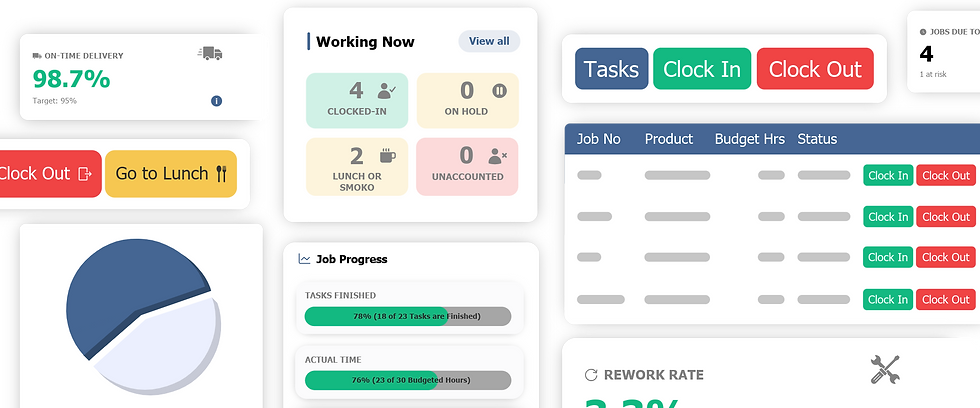
Good workshop scheduling software doesn't just show you a pretty Gantt chart. It gives you a decision-making framework for allocating your most constrained resources: people, machines, and time.
Capacity planning
See each person's and each machine's workload across the week. Not guesses — actual scheduled hours based on job requirements. When you can see that the CNC is at 95% capacity next week and the bench is at 60%, you can make smart decisions about what to schedule and when.
Dependency management
Define which tasks depend on which. If Assembly can't start until Machining is done, the software knows that. When Machining runs a day late, Assembly's start date shifts automatically. Everyone sees the updated timeline without anyone having to manually adjust it.
Real-time tracking against schedule
This is where scheduling and time tracking work together. Your schedule says this job should take 16 hours. Time tracking shows it's at 14 hours and 60% complete. Is it on track or running over? You can see the answer in real time, not at the end of the week.
Visual scheduling
Drag and drop jobs across resources. See conflicts highlighted. Spot gaps in the schedule where you could fit in a small job. This is where software beats a whiteboard — it can show you the full picture across all resources, all jobs, and all time periods at once.
What-if scenarios
What happens if you move Job C ahead of Job D? What if Dave is off sick on Thursday? What if the material for Job E arrives two days late? Good scheduling software lets you model these scenarios before they happen, so you've got a plan B ready.

The Financial Impact of Better Scheduling
Bottlenecks don't just cause delays. They cost real money. Here's how:
Overtime. When jobs run late because of scheduling problems, the fix is usually overtime. That's time-and-a-half or double-time labour — the most expensive hours you'll pay for all week.
Idle time. When one team is waiting for another to finish, they're on the clock but not producing. In a 10-person shop, even 30 minutes of idle time per person per day adds up to over $45,000 per year at a loaded cost of $35/hour.
Expediting costs. Rush freight to get materials there faster. Rush the job through finishing. These band-aid fixes all have a price tag.
Client penalties. Late delivery means unhappy clients. Sometimes it means contractual penalties. Always it means a harder conversation next time you're quoting.
Lost opportunity. While you're firefighting delays on current jobs, you're not taking on new work. Your effective capacity drops — not because you don't have the resources, but because they're stuck in traffic.
Workshops that move from reactive to proactive scheduling typically recover 5-15% of capacity. On a $2 million annual revenue workshop, that's $100,000-$300,000 in additional throughput — without hiring a single extra person.
Getting Scheduling Right: Practical Steps
Start with your constraints
Identify your bottleneck resources. What's the machine, person, or process that everything queues behind? That's where you focus first. Schedule your constraint first, then schedule everything else around it.
Measure before you change
Before you rearrange your schedule, track where time actually goes for two to four weeks. You need baseline data to know if your changes are working. Without it, you're just rearranging deck chairs.
Build in buffer
No schedule survives contact with reality. Build 10-15% buffer into your plans. Not as slack — as insurance against the inevitable surprises. Rush jobs, rework, material delays, sick days. They will happen. Plan for them.
Make the schedule visible
Everyone in the shop should be able to see the schedule. Not just the production manager. When people can see what's coming next, handoffs get smoother, planning conversations happen naturally, and nobody's caught off guard.
Review weekly
Spend 15 minutes every Monday morning reviewing the week's schedule as a team. What's tight? Where are the risks? What changed since last week? This simple habit prevents more crises than any software feature.
Choosing the Right Tool
For NZ manufacturing workshops, your workshop scheduling software should:
Combine with time tracking. Scheduling without time tracking is a plan without feedback. You need both in the same system to see how reality compares to the plan.
Handle job-based work. Not project-based. Not task-based. Job-based — because that's how workshops think and work.
Be visual and intuitive. If the production manager can't understand the schedule at a glance, it won't get used. Drag-and-drop. Colour coding. Clear timelines.
Integrate with your accounting. When time data flows from scheduling into Xero or MYOB through our partner integrations, your job costing updates automatically. No re-keying.
Work on the shop floor. Accessible from a tablet or kiosk. Your team shouldn't need to walk to the office to check the schedule.
The Bottom Line
Bottlenecks are predictable. They happen in the same places, for the same reasons, week after week. The difference between a shop that's always firefighting and one that runs smoothly is data and planning.
Workshop scheduling software gives you both. It shows you where the constraints are, helps you plan around them, and tracks whether the plan is working in real time.
Your margins depend on throughput. Your throughput depends on flow. And flow depends on scheduling. Get this right and the rest of your workshop runs better.
Empower Software combines workshop scheduling with real-time time tracking — so you can plan the work, track the work, and see the difference. Book a demo →

Comments